September 20, 2021

Exploring the impact of an embedded approach to Information Skills teaching

 Information skills teaching is a core element of the service that the Library offers to students and, occasionally, staff at the university. In the past, these sessions were often known simply as “the Library session” or something similar when discussing this support with academic staff. As a result, there has often been misunderstandings and a lack of clarity about what these sessions covered and what students would learn should they choose to attend. Another important characteristic of these sessions was that they were often standalone, relatively generic sessions and even if they were, theoretically, linked to a module, they rarely made any reference to the assignments that the students would undertake on that module so, arguably, were having a limited impact on the overall performance of students taking those modules.


Over the last few years, the picture has changed, increasingly, these teaching sessions are embedded within modules and overall degree programmes. The content taught relates directly to the assessments the students will complete and students are not only developing generic research skills but gaining a greater understanding of the importance of these skills to ensure they complete their assessments to the best of their ability. These changes have often been driven by greater opportunities to discuss where Information Literacy (IL) or Information Skills teaching can be embedded into academic programmes with module leaders, but also wider programme teams as well.


At York, the Academic Liaison Team has recognised that a more embedded approach was desirable but no research had been done by the team to measure the effectiveness of this approach and the impact that this approach actually has on students and academic staff. In 2019/20 I undertook research to measure the impact of embedded teaching on students in the Department of Language and Linguistic Science. The Library delivers IL teaching that is embedded on two core modules in stage 1 and stage 2 of the Linguistics UG programme. Throughout the course of this research, 8 students and the 2 module leaders were interviewed. 


The research demonstrated that a more embedded approach had a positive impact on engagement with the IL teaching in a number of ways. Students noted that the sessions being clearly linked to their assessments ensured that they engaged in a way that they would have been unlikely to had the sessions just been generic sessions that were not timetabled in their regular weekly lecture slot (stage 1) or strongly urged to attend by their module leader who also attended (stage 2). 


In both modules, the module leader was present for the teaching sessions and actively engaged with the session as well. The students felt this was useful but not essential to the success of the teaching. However, both the students and the module leaders acknowledged the value of the module leader being present so that they were aware of the content that had been discussed and could add additional context about their module during the session which helped the students to fully appreciate the importance of what they were learning in the session and how they could apply it to their assessments.


In addition to ensuring that the students will improve their literature searching skills as a result of attending these sessions, it is also hoped that students will increase their knowledge and understanding of the resources available and recognise why they might use one resource over another. As part of the research, students were surveyed before they attended the teaching session and then again after the session so that their answers could be compared to try and measure the impact of the session on student knowledge and understanding of literature searching techniques and the resources available. In the stage 2 students especially, students demonstrated much more awareness of the LLBA database following the session. It was also clear that students had developed a good understanding of the key concepts discussed in both sessions relating to literature searching principles and also evaluation of sources.


Students often overestimate their own IL competency so it was unsurprising that very few students admitted to a lack of confidence in their IL ahead of the sessions but their was a noticeable shift in confidence following the sessions which was one of the most satisfactory findings as a key aim of delivering the teaching is so that students will have the confidence to find high quality sources quickly and efficiently.


It became apparent in the interviews that many students do not have a great deal of awareness of the existence of an Academic Liaison Librarian for their department, and even if they are aware of that, they are even less likely to realise that the Librarian can offer them any additional support and what support might look like. This was also seen in the survey where ahead of the teaching sessions around 80% of respondents indicated if they couldn’t find the information they need, they would either search online, ask the module convenor or a friend for help with only a handful of respondents indicating they would ask a Librarian. Following the teaching sessions, this had dropped to just over  20%. 


In conclusion, this research has offered a really useful insight into the perspectives of both students and staff on the impact that embedding IL teaching into a module and overall academic programme can have. It also demonstrated the importance of taking this approach to ensuring that students engage as much as possible with this teaching as it is critical that students develop these skills, not just to be successful in their degree programme, but also to enhance their future employability. It is hoped that the opportunity will arise to do further research in other faculties as well in order to measure whether students have similar perspectives on other programmes. If you would like to discuss the findings from this research further please contact Tony Wilson (tony.wilson@york.ac.uk) . 


January 20, 2020

Step by step: making videos with Videoscribe

By Ned Potter, Academic Liaison 

In September I made a new video to introduce the Library in 60 seconds. It was designed to be played in short Induction talks, and to be embedded in various online guides. The whole thing took around 4 hours to do (albeit spread across a couple of days) and it turned out pretty well - before we go through the step-by-step process here's the video:


It was made using Videoscribe, and they just published their 'Favorite VideoScribe videos of 2019' which, it turns out not only has videos from the BBC but also from our Library! The video above being featured on their list has reminded me to complete this blog post, which has been in the Lib-Innovation drafts folder for a while...

Step 1: Script-writing 

Because we were also producing a longer virtual tour, I knew from the start this would be only one minute long. This was surprisingly non-limiting in the end: once you accept you can't go into detail on anything, it becomes quite easy to write a friendly voice-over that introduces a number of key points in quick succession. The purpose of the video was to provide an overview, help students understand the basics, and encourage them to ask for help. So a brief script was worked up with that in mind, and I shared it with a colleague for a second opinion, then with the narrators. 

I wanted Yorkshire voices for this introduction to a Yorkshire library, and I wanted people who were friendly and informal, and I wanted it to be a man and a women ideally. Happily my first choice voice-over artists (Sarah Peace from IT and Martin Philip from Academic Liaison) said yes when I asked them to do it! 


Step 2: Voice-over recording 


The hardest thing about recording narration is finding a suitable acoustic in which to record. Even small meeting rooms in our building seem to be echoey, and although the Linguistics Department does have an audio booth we can get access to, it wasn't available in our time frame. In the end we chose quite a big room that has enough in it to absorb any resonance, leaving us with an acceptable sound quality. 

I recorded my narrators on my own laptop using Audacity, a freely available audio-editing tool, and an entry-level Blue Snowball mic I use for webinars. It took 40 minutes to record both this script and the Virtual Tour script, and the main issue was making sure the narrators were close enough to the mic. 

Audacity is incredibly simple to use. You can zoom right in on the visual representation of the audio-waves and easily identify what talking and what is not - for example, in-breaths before a word. Breaths and pauses can be selected, highlighted, and deleted. For this reason, there was absolutely no need to aim for a perfect take of the narration. Each narrator took their time delivering their section, re-running any sentence they weren't happy with. It then took me perhaps 20 minutes to edit the audio into one seamless narration, and export it as an MP3 file to add to the video.
The audio for the voice-over, as displayed by Audacity


Step 3: Creating the video with Videoscribe 

The process of creating a video with this software is to add objects to the canvas (a little bit like you might with Prezi) and then decide how they are animated, and when. So for example you can just type text in and have a hand or pen 'write' the text at the speed of your choosing, or you can add photographs which can either be 'drawn' or pushed into frame by a hand, or just appear. You put all this together, add music and a voice over you if you wish, and you have a video.

I've tended to always build towards a final picture that includes everything the viewer has just seen - so you see each section as it's added, and then at the end you zoom out to see everything at once. But you don't have to use this approach - you can stay buried in the detail if that helps you tell your story.

The VideoScribe interface looks like this:


The main part of the screen displays everything that will appear in the video, but the boxes along the bottom are how you dictate when objects arrive, how they enter the video, and in which order.

Here's a closer shot of that:


All those icons - the phone, the thumbs up, the wifi symbol etc - are from VideoScribe itself. There's also some writing, and (in the middle) a screengrab of the library catalogue.

Absolutely key to a good VideoScribe video, in my experience, is the 'Set Camera to Current Position' button I've highlighted here:


This allows you to control what the camera sees, meaning you can have multiple objects in the frame at once. For example at the end of the video there's a big smiley face and the #UoYTips text added: by default the camera would zoom in so these filled the frame, meaning you could only really see them. But by setting the camera to the same position for the last three sections of the video, you get to see the entire library map, AND the smiley face / #UoYTips in the same shot.

The whole process of creating the video took around 2 hours: trust me, this is REALLY quick for making video content!

Step 4: Exporting to YouTube 

I exported two versions of the video: one directly to YouTube, and one as an MP4 file to embed directly into the Induction PowerPoint presentation me and my colleagues would be using throughout the first week of term. 

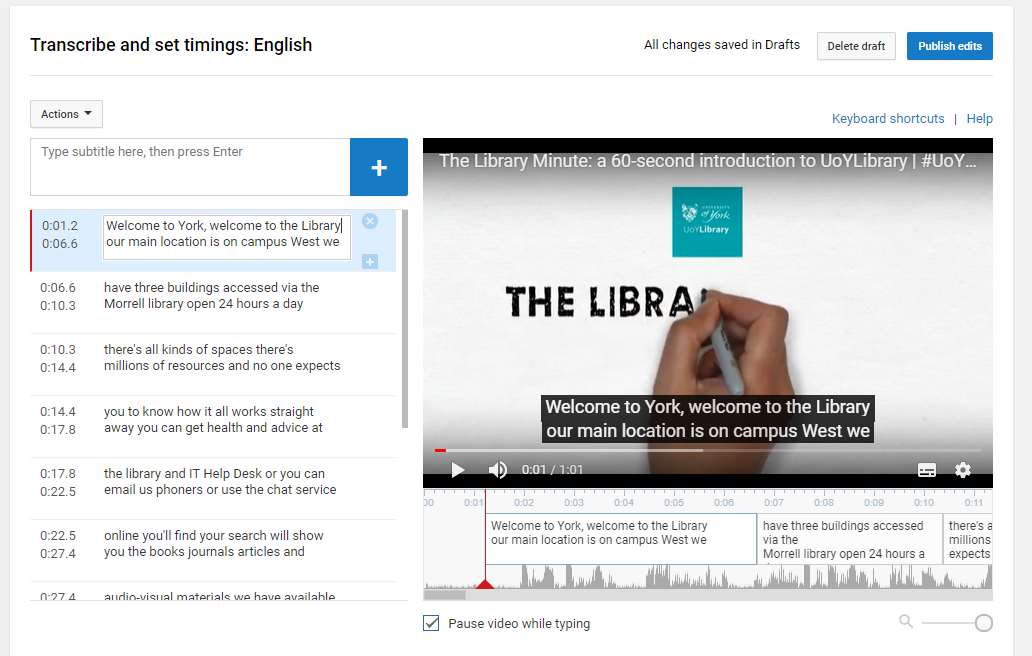
With the YouTube version there was probably around half an hour of faffing involved - writing the description, title, all the keywords, and so on, and editing the subtitles. YouTube's auto-generated subtitles are actually pretty good, but they contain no punctuation or capitalisation and sometimes get names or other words wrong - in screenshot below you can see it says 'you can get health and advice' which I had to edit to 'help and advice':


It's a relatively quick job and of course well worth doing to make sure your video is accessible. 

If you've watched the video above you'll have seen that the narration ends at least 10 seconds before the end - this is because I wanted space to link to another video (the more detailed virtual tour), a clickable thumbnail of which appears in the bottom left of the screen. This was achieved by inserting in YouTube itself, via the End Screens menu. As you can see below, the video itself is designed to receive the thumbnail in that exact position, with the arrow pointing to it. 


One final piece of admin was to create a custom Thumbnail for the Library Minute video itself. YouTube auto-generates three for you - normally none of them quite work as an encapsulation of the video, so you have to make your own (either from scratch or, more often in my case, just by taking a screenshot of the video at the best possible moment).


Step 5: Promotion

Even though the video is a piece of marketing, it still needed to be marketed... I saved a version for adding to Induction slides, and then created a slide in which it was embedded for everyone to add to their presentations.

We also tweeted it, put it on Instagram (where it did much less well than I expected, interestingly) and embedded it on key web pages such as our Info For New Students page.

And that's it! Videoscribe is a tool which we pay for on an annual basis - we don't often do this with so many great free tools available, but we feel it's worth it in this case. If you have any questions about the software or the video above, let us know in a comment... 

July 18, 2019

Understanding the experience of nursing students: part 2

In part 1 of this blog post I introduced our Nursing UX project and revealed some of our findings. In this follow up post I'll cover some further findings and tell you about what we're doing next.

Key findings continued


Students have a love/hate relationship with ebooks

It’s not news that academic libraries have embraced the ebook, but we seem to get a lot of conflicting feedback from students about them. Nursing UX showed that students like to have ebooks; the most consistent negative feedback was about ebook availability, which is perhaps not surprising given that nursing students spend so much of their time away from campus. It was very clear, however, that the actual experience of using an ebook was very often not an enjoyable one. Students presented very practical problems with everything they want to use being accessed through a PC or other single device. For example, one student commented:

If something is in print I can look at what I have typed and the literature, I can look at both at the same time with a simple turn of my head or glance of my eyes. If it is on my computer, I have to flick between the two screens or have a split screen so ... I much prefer print

This presents something of a challenge to the ways in which we provide resources. We have to continue to provide ebooks for their ease of access and to meet student expectations, but must also look at how we enable students to use them effectively. At York we’ve started to have conversations about providing second monitors so that students can work with two screens: one for their writing and another for the ebook. I’m very hopeful that this will start to open up access to resources in a transformative way, allowing students to make the best use of our range of online resources.

Ebooks: loved and loathed in equal measure

They’re also not mad about literature searching

How much help should we give students in learning to use databases? The answer varies hugely depending on the discipline, but in Health Sciences the answer has always been ‘quite a lot’. In recent years, however, I’ve been pushing students to take more personal responsibility for this learning - with mixed results. One student writes:

We do get a session on it but I feel like they are a quick whistle tour and you are sort of left to do it on your own. Which I guess university is all about being independent and work on your own anyway, but I do feel like you are very much left in the dark and you are meant to work that out yourself. I still don’t fully understand CINAHL and Medline but I do try to use them if I can

In fact they have multiple sessions about how to search for literature, but the student’s point still stands. They’ve rightly recognised that they need to be in the driver’s seat for their own learning, but feel lost as to how to get there. This gave me a lot to reflect on with my approach to teaching. I firmly believe that we shouldn’t be spoon-feeding students with skills teaching, but neither do I want to leave them feeling adrift without support. My revised approach to teaching should help, with my sessions immediately being followed by seminars in which students unpack the material with their lecturers. They then have flipped classroom activities to undertake with an optional drop-in for support. This approach seems to be effective; the students have to take an active role, but there is staged support and advice available.

It’s also important to remember that we’re not creating librarians. Yes student nurses need to know about searching for literature - it’s an important skill for their professional lives as well as their academic ones - but they don’t need to be experts and understand every nuance of every database. I’ve therefore taken a very pragmatic approach: give students enough detail and support for where they’re at, situated in their own experience and expectations. Time will tell if it’s a more successful approach, but it’s certainly been more satisfying to teach!

Searching for resources was surprisingly not the students' favourite pastime!

Starting to write essays is the worst

In the semi-structured interviews students spoke a lot about their approach to essay writing. I thought that students would speak a lot about struggling to find sources or not knowing about how to structure their thoughts; these issues certainly came up, but the consistent difficulty was students not being able to start writing. This comment sums it up nicely:

Starting [the essay] is definitely the most challenging… I could read for days and days and not write anything … I think getting past that barrier or the fear of failure is the most challenging

As a result of this, I’ve been working with the department’s lead for academic writing to rethink some of their support in this area. So far we’ve trialled a couple of ‘Shut Up and Write’ sessions timetabled specifically for the nursing students (we’d run this previously for PhD students but never at undergraduate level). The attendance wasn’t great at either session, but the students who came really valued it - either for dedicated writing time or as an opportunity for tailored feedback. We’re going to look at how we can plan these sessions for next year. Part of the challenge is finding times when the students are both on-campus and actually starting work on a summative assessment - not easy for any group, but especially ones who aren’t always around on campus.

The hardest part of essay writing was being faced with a blank page

A studious environment makes you feel more studious

Many of the students noted that they like working in the Library because it actually feels like they’re working.

I find that I really struggle to write unless I am in the library, so I find it quite an inspiring place to write and I have been up here till about 4 am just happily writing

I find it quite an inspiring building, being around all the books ... When I see other people studying I feel I can study … even my flatmates will all make the journey here and we use [group study rooms] in the evening, we just come in and it’s like a big community

That sense of community was a recurring theme for the students. They like studying in a way which connects them to their peers, especially given that they might not see people for long periods of time during placements. For that reason many of them make a beeline for the Nursing section in the Library; they might bump into their fellow nurses and have a sense of comfort, but they’re also somehow absorbing relevant knowledge from the books across the aisle. But what use was any of that to me? With such a captive audience, I was missing a trick by not targeting messages to them directly. I therefore decided to set up a noticeboard specifically for the nurses, located near to the books which they use most often. I know, it’s not going to change the world, but I think it’s been a useful way of flagging up some key information. Just don’t ask me to measure the success on that one!

Many students preferred working with their peers around them

What next?

I’m now busy working on the recommendations from the project. Some have been very easy to achieve: buying new editions and weeding old stock, setting up the comms plan. Others are beyond my immediate ability and will require a lot more thinking from the Library as a whole. What’s important, though, is we’ve got a really strong set of actions and a robust data set to inform future planning. We’re just embarking on a new way to oversee projects in the Library, and I’m very hopeful that Nursing UX will inspire a lot of these new pieces of work.

On a personal note it was hugely eye-opening to carry out this research, and it’s given me a fresh perspective on a lot of the issues which students raised. I was a student longer ago than I’d care to admit, so it’s easy to forget just what a learning curve it was. And I was never a student nurse with the added pressure of placements! Hopefully we’re starting to put things in place which will make students’ lives easier, but just by kicking off the conversation we’re doing just that.

How do these findings compare with observations from your own institutions? Let me know by leaving a comment below.

July 11, 2019

Understanding the experience of nursing students: part 1

What do nursing students want from their university library? That question was on my mind for a while, reinforced by a context of negative feedback and middling-at-best satisfaction. It was clear that we weren’t quite hitting the mark as a service, but what were we missing? In this blog post I’ll give you an overview of a project I ran to learn more about nursing students’ experience of the Library and to consider what changes we could introduce to their (and other students’) benefit. I’ll focus on my overall approach and some of the key outcomes from the project.

What was the aim?

This project, referred to in shorthand as Nursing UX, was designed to address the lack of granular feedback currently provided to the Library by nursing students. Whilst we did receive some feedback from students, this never felt detailed enough to make any meaningful service improvements. I therefore wanted to understand more about students’ current level of knowledge about the Library, and build on that to consider what more we and the department could be doing to support students. Ultimately I wanted to complete the research with a set of specific recommendations to take back to the Library’s Leadership Team.

As much as this was a project designed to support nursing students, I also wanted to make sure that - wherever possible - the recommendations would benefit other students in the department and perhaps even the University as a whole.

The research aimed to identify where we were missing the mark with students

What did the research involve?

I used a range of user experience (UX) methodologies in this project. If you’re not familiar with UX, take a look at some of the ways we’ve used it at York. The techniques were:
  • Classroom voting, where I asked whole cohorts to complete a short questionnaire at the end of one of their lectures. This was designed to identify the overall level of knowledge of different library services in each cohort, as well as their general feelings and preferences for those services.
  • Touchstone tours, in which students led me around the Library and explained how they use the space and what they like and dislike. This technique aimed to see what resources and services were a priority for students, but it was also illuminating to see what they didn’t mention on the tour.
  • Semi-structured interviews, in which I asked students to draw a cognitive map of their process for writing an essay. This was the launching off point for a discussion about their academic experience generally, gradually focusing down to questions about their experience of using the Library.
I then brought together the results from all three methodologies, thankfully with the help of an intern who had much better capabilities with statistical analysis than me! For that reason I won’t go into the methodology, but I’ll talk about some of the key findings from the different elements of the research.

What were the key findings?

In this section I’ll give an overview of some of the key findings from the research - some surprising, some reinforcing things I’d heard elsewhere.

Comms, comms and more comms

One message came out very clearly in the results: students who have a greater knowledge of the Library are more likely to use either physical or electronic resources. Not rocket science perhaps, but it was nonetheless useful to confirm that it’s worth taking the time to ensure that students know about our services. I thought I was doing this relatively well, so it was a much needed wake up call to realise that lots of students hadn’t grasped some fairly basic introductory information. For example, one student commented:

I didn’t know about this until recently, that [YorSearch] will tell you exactly where it is in the library, it will give you a code … I would just walk up and down thinking ‘where the hell is this book’!

This is despite me having talked about this numerous times in teaching sessions and through classroom activities, so clearly something wasn’t quite clicking for some students. It was really worrying to me that many students might have been in the same boat, and were too anxious to ask for help (more on that below). I therefore created a comms plan for how I would get messages to students, incorporating face-to-face opportunities and email follow up. This has been in place this academic year and seems to be working well, although it’s sometimes been a challenge finding time in busy periods for this kind of bespoke interaction. It’s been worth it, however, as it’s given me more face time and, hopefully, credibility with the students.

I’ve also learned not to be afraid to repeat things. Even if many people in the room already know about it, there might be that one person who’s still wondering the shelves looking for a book! There’s a fine balance here, of course, as we also want students to become independent and to ask for help when they need it.

Our messages to students were sometimes getting muddled or forgotten

Students’ anxiety is a real problem

It’s easy to forget that many students will never have stepped foot in a library before, let alone one of the scale of an academic library. No wonder then that students they’ve reported feeling overwhelmed. One student sums it up perfectly:

When you come to the library it’s really daunting, because you’ve got loads of people who know what they’re doing, sat at desks, typing away.

This isn’t the only time I’ve heard this feedback from students, so it clearly wasn’t limited just to the nursing students. It did seem, however, to be a more widespread issue within this group. This is ultimately a crucial issue for academic libraries; our universities will expect students to be making use of our resources, but many appear too intimidated to do so. Nursing UX showed that students who used the Library more frequently were more likely to provide more positive feedback. There is absolutely, then, a vested interest for libraries to encourage students to use our services; it’s for their benefit, but also means that we get a positive result for what is becoming a key metric.

So how do we make students feel welcome and not overwhelmed? I have no ‘lightning in a bottle’ answers sadly (add a comment if you do!), and this is something we’re still thinking about here at York. It’s at least partly to do with what students see when they enter the building (read more on this from our UX Space project), but it also means breaking down barriers to support. We’ve got a really helpful and friendly group of staff at our Help Desk, but many students seem worried to approach them for assistance. Roving help might be a way forward - going to students at the point of need - but we’ve got some more thinking to do on this. For now it’s really illuminating to know that students have that anxiety about using the Library, so talking to them openly and honestly about their concerns can only be a good thing.


Some students felt too intimidated to use the Library. Hardly the warm welcome we were aiming for


That's it for now. Check back next week for part 2, where I'll talk about some of the other findings and what we're doing as a result.

June 26, 2019

Embedding UX

By Ned Potter, Academic Liaison Librarian 

At UXLibs IV, Michelle Blake and I presented on embedding UX at York and trying to make it part of our culture. We then wrote up the article for the UXLibs Yearbook, and the Open Access embargo period has now come to an end so please go and have a read! You'll find the article here in the White Rose repository, freely available to download.

UX methodology is becoming more firmly established in the Library sector, moving from novelty to maturity. The article focuses on how do we've tried to ensure that our internal processes, systems, and ethos support this, and make UX truly part of our daily ‘business as usual’, rather than being a perpetual project... 

If you're interested, our slides from the conference are here:


To give you a flavour of the UXLibs yearbook article, here's an excerpt:

Top tips for embedding UX at your own institution 


We thought we’d end with five tips for embedding UX. We’re not trying to suggest we’re the experts here, or that we’ve perfected our strategy. But we have gone a long way to make UX part of the culture at York, and here are some of the things we consider to have been most important in achieving that:


You need buy-in from the top. 

Of course you do, this is news to no one. The key is to link UX to the existing aims and strategy of your organisation and management. People are much less likely to buy in to something in UX silo than they are to buy in to something which helps them achieve what is already on their agenda. Persistence is important too. Many institutions have found it’s a lot easier to get permission to diagnose problems through ethnography than permission to try and solve them through actual design changes - but don’t be discouraged, keep suggesting ways to improve things, and celebrate successful changes widely - and publicly. Which brings us neatly to...

Go beyond the walls of your own institution. 

The more you shout about your UX work to the wider world, the more it is appreciated inside your own institution. In a strange way, external validation can influence how valid something is considered internally, and if your work is out there and talked about this can help enormously.

Repeat after me: UX is not cool. 

The sooner UX is no longer framed as this hip new thing, the better. UX is a suite of useful tools that enable us to better know our users and improve our services for them. Nothing about that is faddish. UX is not trendy; UX is essential to improving library services.

Time is SO important for UX. 

It is important to be realistic about just how much time UX takes. We’ve found the 4:1 ratio - the idea that for every hour of fieldwork you’ll spend four hours analysing and making recommendations - to be remarkably accurate. It’s a messy business, ethnography, and only worth it because of how incredibly productive it can be. Investing time in staff so that everyone feels like they can truly understand and utilise these techniques is important. Time to keep up to date through networking at events, attending presentations, and reading the literature. Time for each project. Time to analyse results. Time to act on the data.

You get more impact from quality than you do from quantity. 

Embedding UX at an institution is not about trying to crowbar it into every facet of working life, in fact the opposite is true. Focus the way you use your resources and aim for true impact on the users of your service.

 UX truly takes root not because you do it all the time, but because when you do it you make a genuine impact, you truly learn, and things change as a result.


If you'd like to read the rest of the yearbook article, please download the article here!

June 19, 2019

What's in a citation? Does using high quality resources lead to better marks?

I’ve been telling students for years that using high quality resources in their assignments leads to them getting better marks. But is that actually true, or have I just been repeating that mantra in the hope that students pay attention?! In this blog post I’ll tell you a little bit about a piece of research I carried out with our Nursing programme to test that claim. I’ll focus on the practicalities of how I worked with departmental staff and some of the outcomes; you can read more about the process of the research in my article in the Journal of Academic Writing.

What was the research?

Inspired by something I’d seen at a conference - there are no new ideas after all! - I carried out citation analysis on some randomly chosen examples of students’ essays, from across all three years of the BSc Nursing programme. The analysis was in two stages: first I coded the bibliographies to determine the type of references used, then I gave each bibliography a rating depending on the quality of the selected references. I then compared the marks given to each essay against the quality of the bibliography. This showed that there was a relationship: the students who had used better quality resources generally received a better mark. Hooray, I hadn’t been misleading students after all!

Some books, because how else do you visually represent referencing?!

Why did it work?

As much as this research was important for my own teaching, the main reason it worked at all was that it was also important to the department. It wasn’t just a vanity project! I’d heard anecdotal feedback from academics that students were often using poor quality or otherwise inappropriate references in their work, so this was an opportunity to explore that feedback in more detail. If you’re thinking of doing something similar I believe that buy-in from the department would be essential; there has to be a benefit to them as well as to you.

It was also hugely beneficial that I maintain a strong working relationship with the department, which otherwise would have made this project impossible. I needed the department’s overall backing for the research, but also specifically needed the help of their Assessments Office to provide the example scripts and the students’ marks. I also went through the department’s ethics procedures for the research. If you’re thinking of doing something similar then that strength of relationship is vital, both to make the research happen practically but also for it to have a lasting impact. In my case I was also later able to co-author the resulting journal article with academic staff from the department, so there was a really useful product for everyone at the end of the process.

Was it worth it?

A resounding yes! Although that’s maybe not what I would have said when I was in the middle of analysing all the scripts! Whilst it was undoubtedly a lot of work to undertake, it’s been hugely beneficial to have an empirical answer to my assertion that using better resources was a good thing. I’ve been able to use this information since in my digital literacy teaching, so it’s directly informing the support that I give to students. This was especially important given the target audience of student nurses; I teach them about evidence-based practice, so can now say with certainty that I practice what I preach!

On a personal note I also found it a refreshing change to carry out a research-based project. It was a valuable opportunity to demonstrate the academic rigour of information literacy work and a useful learning curve around the research and publication process. It did highlight, however, that a future in statistics is very likely not on the cards for me!

What next?

I wanted to make sure that the research didn’t stop there, and that it brought about meaningful change. I reflect in the journal article on the need to address poor referencing in the early stages of a student’s degree, as it was very noticeable that bibliographies in the first year in particular were quite poor (and not entirely surprising given that referencing will be a new skills for the majority of students). I therefore transformed the teaching I offer in the first year to focus much more overtly on choosing high-quality references and creating a fully-formed and credible bibliography of resources. This has been well received by students, many of whom really struggle with this skill, in particular knowing what ‘good’ is supposed to look like in their essays.

Here are my redesigned slides:


I’ve also moved to a new model in my teaching on the BSc Nursing programme, moving away from a workshop-style delivery to a more integrated approach. I now provide an introductory lecture in certain key modules in the programme, each of which is immediately followed by seminars facilitated by academic staff. This means that staff and students are more engaged in skills development, and that my content is seen as a core part of the module rather than an optional extra. Students also have follow-up activities to complete in advance of their next seminar, setting an expectation that they need to take an active role in their own learning. Thinking back to referencing in particular, this has foregrounded the importance of students being able to select appropriate, scholarly resources and has encouraged academic staff to consider this as part of wider curriculum redesign in the programme. Not bad for what started as a random train of thought at a conference!

Have you carried out any similar research? Let me know your comments and questions below.

December 18, 2018

Branding the academic library

By Ned Potter, Academic Liaison Librarian

Earlier in the year I got to head over to Denmark, to deliver a keynote at the Danish Academic and Research Library group's annual conference. The subject of the conference was marketing, and I was specifically asked to talk about the academic library brand.

Here are my slides:

 
Branding the Academic Library from Ned Potter

There were a couple of key points I wanted to get across - one is that the brand is everything your users experience! Colours and logos are branding, and they are part of a wider attempt to positively influence the brand - but we can't control the brand. The voice we use in our communications, the experiences people have at the front desk, the collections and services we offer: all of this makes the brand.

We also can't influence the brand on a national or global level - at least not without a great deal of difficulty. It's a lot more realistic for each specific University library to try and build a better brand; rather than to try and change the overall perception of the academic library as a concept.

I also stressed, as I always do, that the key to marketing libraries well is to do so in campaigns. Any questions or comments, let me know below! 

November 19, 2018

[Video] UX keynote all about ethnography and design at York

By Ned Potter, Academic Liaison

This month I had the honour of giving the opening Keynote at the Stellenbosch University Library Symposium, the theme for which this year was User Experience.

I've travelled to South Africa for a conference before and it was one of the best professional experiences I've ever had, but this time I couldn't quite make the huge journey time work, with it being Autumn term, so we decided to do it virtually. We chose a mixture of recorded and live - I created a video, using Screencast-o-matic which I love, and then we did the Q&A live via Skype. I thought this was safer than trying to do the whole thing live and risk technology failure...

Although my colleagues and I have talked about UX at various events over the last three years, this was the first time we'd had the length of time afforded by a keynote, and my hosts had specifically asked to hear about the projects we've done at York - so essentially I pulled together all threads we often write about on this blog into one big presentation. I've embedded the video below and of course you're more than welcome to watch the whole thing if you'd like to! But given that people often have specific areas of interest around UX, here are some shortcuts to the various parts of the presentation:
  1. After the preamble there's an introduction to UX and ethnography. What it is (and isn't), the way it has spread across the industry, why it's so powerful. 
  2. Part 2 is a A timeline of UX at York. I discuss the various major UX-led projects we've done, our use and non-use of interns to help us, and the various ethnographic techniques we've used
  3. The massive up-scaling involved for the Understanding Academics project, plus some of our findings and the changes we made, are discussed next
  4. How we try to disseminate our findings and experiences is covered here
  5. Next I cover steering and guidance for UX. How it fits strategically, our UX Group which includes our UX book club, and so on
  6. Training and Support for UX is discussed here: our internal training sessions and the way we've been trying to bring this techniques to other parts of the University
  7. Finally, some tips for embedding UX at your own institution

There were some great questions afterwards not captured by this video. One of them was around the use of interns and the pluses and minuses of this. At York our first two UX projects were intern-led and we found this hugely beneficial for a number of reasons: someone having the time and space to focus on the fieldwork and analysis without other distractions was part of it, but so was having a completely fresh pair of eyes involved. There are advantages to non-library staff speaking to users as part of the fieldwork and bringing an outside perspective to the design recommendations.

That said, we did all the fieldwork for our two biggest UX projects to date ourselves, partly because it was such a good opportunity for as as staff to be learning about our users first-hand. It's also a fascinating process to be part of and a good opportunity for staff to learn new skills.

So without wanting to sit on the fence, there are good arguments both for using interns and for doing everything yourself...

______________________

Thank you so much to everyone at the Conference for inviting me and allowing me to present virtually. It was fun to put together.

November 06, 2018

Building the Fabrik Wall

By Ned Potter, Academic Liaison Librarian 

At the start of the academic year we reached a significant milestone in our use of UX at York (about which you can read many, many more posts elsewhere on this blog). We made our first major purchase as part of a re-design that came directly from an ethnographic project - woohoo!

We bought a sound-absorbent wall made of 'Fabriks' - it works like giant Lego, looks pretty cool, and controls the acoustics of the environment around it.

Here's what it looks like:

The Fabrik Wall as seen from the front

The Fabrik Wall as viewed from 'inside' it
To get the context to all of this we need to go back to 2017.

The UX Space Project

During 2017 we undertook the UX Space Project: ethnographic User Experience research into how the Morrell Lounge is used and how it might be improved. This is the area you see as you enter the Library at York - on average around 3,000 people pass through this every single day, making it perhaps the busiest area on either campus. At peak times there's around 7,000 entries.

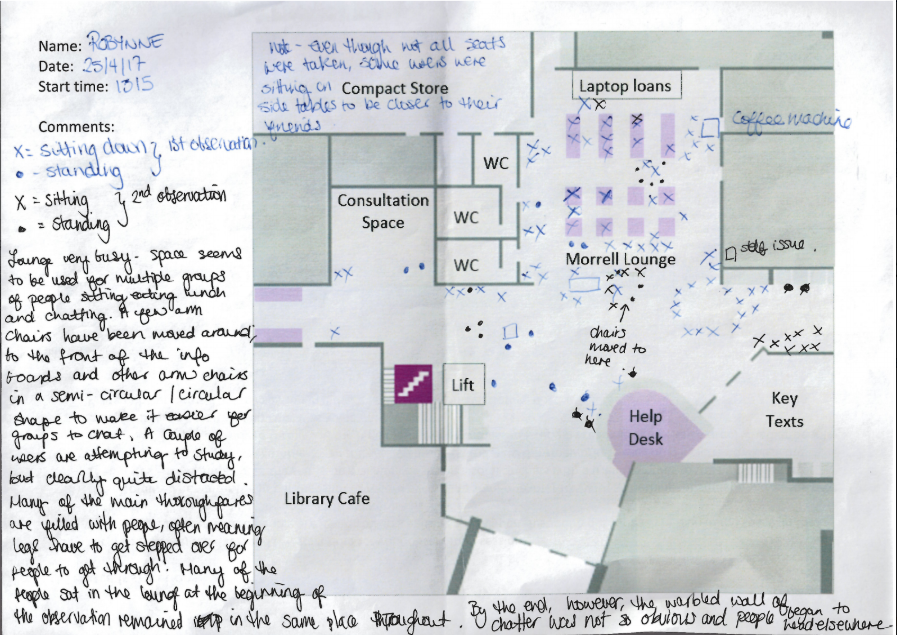
The fieldwork consisted of more than 40 sessions of behavioural mapping. We actually had to modify the 'standard' way we'd done observation like this before, because the area was simply too busy to track people's routes through the space. That element was removed from the list of responsibilities, but we made other tweaks too: for the first time we used a template map of the space (based on our floorplans), we put a definition of the AEIOU framework on the back along with other guidance to remind people what they were looking for, and left space for notes on the map itself.

Here's an example of the map and notes from one observation session:


A behavioural map with notes 
The fieldwork was undertaken by Customer Services staff (each of whom had individual training before their first session) and they were absolutely brilliant at capturing key info, and then feeding into the design process to find solutions too. All CS stuff kept notes of their thoughts on the space when working at the desk too, so we built up a picture of how the area was used even on days when we didn't have a Behavioural Mapping session planned. This turned into a massive 19-page Google Doc, which also included feedback from students and staff as it came in.

The initial phase of fieldwork lasted 6 months. The project identified problems including the area being too loud for those wishing to seek guidance at the Help Desk, it being unsightly to visitors as students are sprawled on the floor, and fundamentally the space not being used as we intended.


Design Prototyping

We ruled out trying to change the way the space was used, early on in the process. Instead we wanted to change the space to better suit the way it has been adopted by students and staff: this included swapping furniture with other areas of the Library to suit the way people congregate in groups, which was our first proper attempt at design prototyping. The changes we made went down so well, getting so much positive feedback (we had people emailing the library just to tell us how much they liked it!), that following another round of observational fieldwork we ended up leaving the temporary furniture in situ. It's still there now, although long term we'd like to improve the space further - we have a full design ready to go, based on all the research and suggested changes we've come up with, but it will cost a lot of money to realise.

Most costly of all we really wanted some kind of acoustic baffling to both contain the sound and make the entrance lobby a visually arresting sight with which to greet our regular users and visitors. We went through several rounds of a bidding process to try and win some Alumni funding to make big changes to the space - in the end the 'YuFund' scheme provided us with the funds to purchase what we're calling the Alumni Wall that you saw at the start of this post, made of special sound-absorbent ‘fabriks’ to change the acoustics of the space. And the acoustic difference is absolutely remarkable, significantly reducing the noise spilling from the Lounge, and in particular better enabling staff and students to converse at the Help Desk. Many staff have commented on the effect this has had - it is now noticeably easier to help people with queries - and the students like it too: ’Wow I really like it!’ one returning student exclaimed, coming to the desk especially to tell us… It also looks fantastic, and gives the whole area a more cohesive feel.

The whole project felt really exciting to be part of. It involved people from different teams in the Library working together, which is always good, and the Alumni Office (and the Students' Union) were really enthusiastic about what we were doing. Ultimately we were able to make a significant change to the space, and overall it works much better for both students and staff than it ever has before.

Finally, here's a short time-lapse video of its assembly:


July 19, 2018

Understanding Academics: themed analysis (presentation at LIBER 2018)

Two weeks ago I presented our themed analysis from the Understanding Academics project at the LIBER conference in Lille. We've previously published our results from the project on what it means to be an academic at York. For this conference, we focused on the three main themes emerging from our research: skills, scholarship and space. These have now formed the basis of the new Library and Archives Strategy at York.

Michelle Blake and I will be publishing our full themed analysis shortly. In the meantime, you can get a flavour from these conference slides. Please get in touch if you'd like to chat through our results. We're always happy to talk about our work!

Vanya Gallimore
Academic Liaison Team Manager

June 06, 2018

Embedding UX and Ethnography at York

By Ned Potter, Academic Liaison Librarian

Michelle Blake and I presented at the amazing UXLibs IV Conference today, about our approach to trying to move into a more mature phase of UX - something truly embedded in the culture, rather than a bolt-on, a silo, or a fad.

I've adapted the slides below slightly to include more text on screen - hopefully this gives you some idea of how we've gone about things. Any questions, we're very happy to talk about it more...


March 15, 2018

RLUK presentation: Understanding Academics

Today I'm presenting at RLUK about our 18 month UX project, Understanding Academics. We're really proud of this project and what we've achieved with it. This speed presentation aims to provide an overview of the project and what it achieved.


We've already written about our UX activities a lot including this project. If you're interested you could look at some of our previous posts including our first post on the project, Understanding Academics UX project, and one detailing how we actually dealt with all the data the project created, Processing and ACTING ON 100+ hours of ethnography: a 5 stage approach.

There are also lots of other posts about our UX activities and we are in the process of writing an article which, when published, will be linked to from here.

And as always if you want to know more please get in touch with us.

Our article has now been published and you can view it for free via the White Rose Repository.

January 30, 2018

Running library induction like a marketing campaign

By Ned Potter, Academic Liaison Librarian 


Running Academic Library induction as a marketing campaign from Ned Potter

We won an award! York just received a Bronze Marketing Award from CILIP's Publicity and Public Relations Group at the annual PPRG Conference, held in Birmingham in January.

It was in relation to the work we'd done on our Induction project - in 2016 (and then this year as well) we got rid of the big orientation games, and ran it like a marketing campaign. It worked really well and we got a great response - some elements weren't successful and we improved on them this year.

The slides from my talk are above, or alternatively you can view a video below. This is the audio from my talk, with a version of the slides designed for the video instead of for face-to-face presenting - there's videos-with-the-video, and other things to make it a bit more interesting to watch...


It was a great conference. The other award winners had all done really good campaign marketing too, and this supports an idea I bang on about all the time, which is that it's campaign marketing that really works. The same message, tailored across multiple platforms, for a concerted period of time: that's what is required for marketing to be effective.

Thanks to the (soon to be renamed!) PPRG group for the award and the excellent event. 

January 25, 2018

Digital Literacy Programme

By Michelle Blake, Head of Relationship Management

At York we have recently set up a Digital Literacy Programme to improve the digital capabilities and confidence of all our staff and students. Over the last few years we’ve concentrated on student digital literacy, working in partnership with other professional support services and academics on enhancing programmes through the York Pedagogy project. This project involved us commenting on every undergraduate and postgraduate programme and we’ll write something on it soon. It also saw the development of our Skills Guides and Digital Wednesdays initiative.


Over the last year we have begun to focus on staff and our first stage, information gathering, has now completed. It sought to:
  • Identify the issues and challenges when developing staff digital capabilities across the University;
  • Identify priorities for digital skills development for Library staff and any gaps in confidence; 
  • Learn lessons about staff digital literacy that can be applied to the wider University staff. 

We have been able to condense the detailed findings into these key issues to be addressed:
  • Gaps in foundational level understanding and skills that lead to longer term problems with confidence, attitude and skill 
  • Lack of understanding of collaborative and organisational tools
  • Staff expectations (their own and their managers)
  • Support for new staff 
  • How to support and change practice amongst existing staff 
  • Lack of awareness of what support is available and how to access it
  • Commitment to ongoing staff development
  • Sharing of good practice, inspiring staff and maximising impact
  • Attitudinal barriers and varying levels of confidence
  • Sustainability and scalability

The main outcome of our first project is the establishment of three new projects under the Digital Literacy Programme:


Library & Archives: building digital skills

Timescale: November 2017 -  Summer 2019 (anticipated)
This project will take forward many of the findings of this initial scoping project. It will include the analysis of the pilot group data and alignment of individual team recommendations to develop, implement and evaluate a programme of digital skills support for Library & Archives staff. Project components to be taken forward:
  • Three level training and development programme:
  • IT Essentials: How IT works
  • Working practices: How we work
  • Aspirational: How do I make it work better
  • Creation of role descriptors
  • Exploration of scalability and sustainability
  • Support for existing staff
  • Support for new staff
(It is anticipated that this project will be used for the basis for staff across the University)


Digital leaders

Timescale: October 2017 - December 2019
This project partners with the University’s Leadership and Development Team to embed digital skills within the Leadership in Action programme by the:
  • Creation of a new session on digital leadership
  • Creation and embedding of a self-diagnostic resource for participants 
  • Links to sources of further support for developing personal digital skills
  • Embedding digital tools and tasks throughout the course to model some best practice use of collaborative tools in particular

The first cohort commences in January 2018 and the second cohort finishes in September 2018. We expect to trial out approaches during 2018 and refine these for 2019 and beyond.


Training pathways

Timescale: January 2018 - December 2020 (anticipated)
The Digital Literacy Training Pathways project seeks to understand the digital literacy linked to core working practices from across a range of staff stakeholder groups, to ensure that we are providing adequate support and training to new and existing staff. The project proposes the development of generic and bespoke support and training materials tailored to the requirements of staff undertaking a range of roles at the University at different stages in their career.


Some of the expected outputs of the training pathways project include:
  • Surfacing of existing content under the banner of staff digital literacy and identified practices;
  • Identification of digital literacy training requirements of academic staff, professional staff and administrative staff based on work undertaken with pilot groups;
  • Development of new training and support materials based on stakeholder requirements and core digital competencies, including:
  • Online support materials
  • Face to face workshops/activities to be embedded in existing programmes
  • Awareness raising and marketing of digital tools/practices;
  • Creation of a collection of case studies from pilot groups to encourage digital literacy development more widely across the University;
  • Development of online platform and access routes to training materials. 


We expect this to be the first post to introduce the programme of work that we’re undertaking and hope to provide regular updates about the projects here.